Building and Running Process
The Program Generation Flow
Building and running a C++ program is a multi-step process, that can be described as follows:
- First, the code is run through a preprocessor, which recognizes meta-information about the code. The preprocessor may for instance perform a textual replacement of symbols defined in the code, before compilation applies.
- Next, the code is compiled, or translated into machine-readable object files.
- The individual object files are then linked together into a single application.
- Finally, the generated executable file or program image is stored/downloaded in the program memory - normally an on-chip flash memory -, to be fetched by the processor.
This process is better described in the picture below:
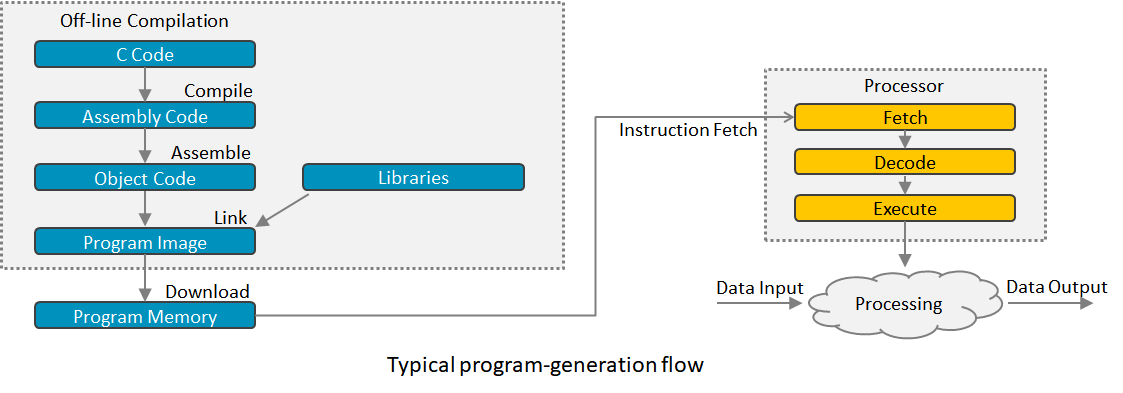
In more details, the build process can be decomposed into the following stages:
- Preprocessor: Processes commands that begin with #, like macro replacement
- In C or C++, lines that begin with the hash-tag (#) contain commands for the preprocessor.
- The preprocessor processes all commands, like replacing macros, defined by an initial hash-tag (#) in the code.
- Parser: Reads and analyzes C/C++ code for syntax errors
- Reads in C/C++ code.
- Checks for syntax errors.
- Forms intermediate code (tree representation).
- High-Level Optimizer: Modifies intermediate code (processor-independent)
- Code Generator: Creates assembly code from intermediate code
- Creates assembly code step-by-step from each node of the intermediate code
- Allocates variable uses to registers
- Low-Level Optimizer: Modifies assembly code (parts are processor-specific)
- Assembler: Creates object code (machine code)
- Linker/Loader: Creates executable image from object file
The Preprocessor Directives
Preprocessor directives are instructions processed before the actual compilation of the code. They are denoted by the # symbol.
#include
#include <file>
#include "file"
Functionality: The specified file is inserted into the code at the location of the directive. Using <> means that the file is provided by the implementation (standard libraries), using "" means that the file will be searched based on include paths provided to the preprocessor.
Common use: Almost always used to include header files so that code can make use of functionality that is defined elsewhere.
#define
#define key value
Functionality: Every occurrence of the specified key is replaced with the specified value.
Common use: Often used in C to define a constant value or a macro. C++ also provides other mechanisms for constants. Macros must be used very carefully.
#ifdef and Conditional Compilation
#ifdef [key]
#ifndef [key]
#if defined(key)
#else
#elif [key]
#elif defined(key)
#endif

#if <value>
#elif <value>
#else
#endif
Functionality: Code within the #ifdef (“if defined”) or #ifndef (“if not defined”) blocks are conditionally included or omitted based on whether the specified value has been defined with #define. <value> can be an expression using keys and evaluating to a boolean.
Common use: Used for differentiating among different configurations. Also used to protect against circular includes.
#pragma
#pragma
Functionality: Varies from compiler to compiler. Often allows the programmer to display a warning or error if the directive is reached during preprocessing.
Common use: Platform specific.
Example
For a better understanding of the preprocessor, let us look at a simple example. We define a header file named definitions.h which contains a single definition of the key TABLE_SIZE. We include this header file in our main.cpp file - the file that defines the main function executed at program launch - and use the TABLE_SIZE to define the main.cpp behaviour.
definitions.h
#ifndef DEFINITIONS_H
#define DEFINITIONS_H

#define TABLE_SIZE 1024

#endif // DEFINITIONS_H
main.cpp
#include "definitions.h"

int table[TABLE_SIZE];

int main() {
    for (int i = 0; i < TABLE_SIZE; i++) {
        table[i] = i;
    }
    return 0;
}
When the preprocessor runs, it replaces the #include "definitions.h" line with the contents of definitions.h, so the compiler sees the expanded code with TABLE_SIZE defined.
After preprocessing, the source file contains the contents of definitions.h in place of the #include directive, and the compiler processes the expanded code.
Preprocessed main.cpp
int table[1024];

int main() {
    for (int i = 0; i < 1024; i++) {
        table[i] = i;
    }
    return 0;
}
Header Include Guards
Typically, C++ header files also make use of preprocessor definitions to make sure that they are only included a single time. For this purpose, each header file defines a unique symbol and will skip its content if the symbol is already defined like shown below:
#ifndef _DEFINITIONS_H
#define _DEFINITIONS_H

// Header file body goes here

#endif // _DEFINITIONS_H
As an alternative the #pragma once directive can be used for the same purpose. It is supported by
most toolchains.
#pragma once

// Header file body goes here
Macros
An important point is that a programmer should never forget what the preprocessor does: it textually replaces the symbol in the source file before it is compiled. This practice is still used for C++ programming, but because using preprocessor directives may lead to unexpected errors, it tends to be replaced by more robust and modern patterns. For demonstrating some potential problems, let us look at the exercise presented by the main.cpp file.
If you answer to the questions asked in the main() function, it becomes obvious that, in C++, one should rather use inline functions rather than macros for defining functions. Also, defining constants using static constexpr should be preferred to using #define macros.
Example of a macro that can lead to unexpected results
Execute the following example and observe the results. Then, try to understand why the results are what they are. Finally, modify the code to use inline functions and static constexpr constants instead of macros and observe the results.
#include <iostream>

#define absolute_value(i) ( (i) >= 0 ? (i) : -(i) )

static int nbrOfCalls = 0;

int f() {
    nbrOfCalls++;
    return -1;
}

int main() {
    int x = -2;
    int ans1 = absolute_value(++x); // what is the value of ans1 ?
    int ans2 = absolute_value(f()); // how many times is f() called?

    std::cout << "Value of ans1 is " << ans1 << std::endl;
    std::cout << "Nbr of calls of f() is " << nbrOfCalls << std::endl;

    return 0;
}